
YABANDPAY · DOCUMENTATION
Block List Management (Block List)
Maintain the block list through search, bulk uploads, and deletion to prevent further transactions using blocked identifiers.
Block list management helps merchants identify and block users who present a risk or engage in malicious behavior. By configuring the block list, merchants can prevent such users from initiating further transactions and safeguard transaction security and compliance.
1. Access the Feature
In the portal, click “Settings” > “Block List” to open the block list management page.
2. Feature Overview
View Block List Entries
On the Block List page, you can view all block list records that have been added.
3. Search and Filter
Use the search bar to quickly locate specific block list entries by Referral, Reference, or Type for review and management.
4. Add and Maintain Block List Entries
Add Entries by Uploading Data
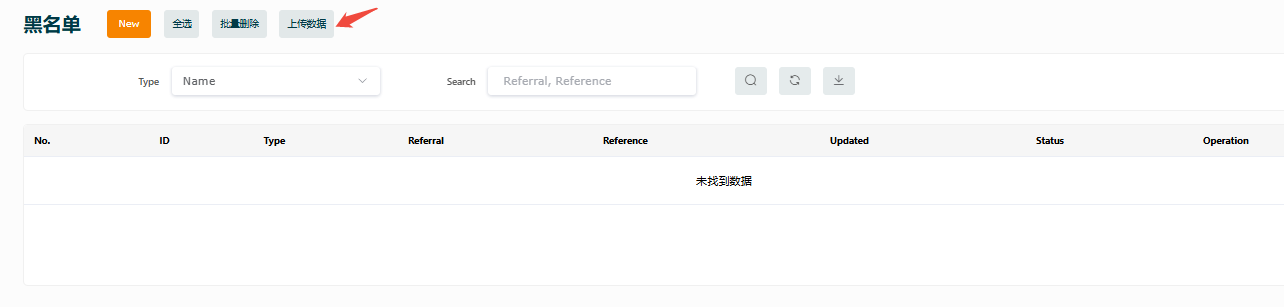
Merchants can add block list entries in bulk by uploading data. The file should contain at least one column of identifying information, such as user ID, IP address, or email address. After a successful upload, the system will automatically synchronize the updates.
Bulk Delete
To remove existing block list records, use “Bulk Delete” on the page and select multiple records to remove them at once.
Tip
Once block list data takes effect, listed users will no longer be able to transact using the blocked identifier. We recommend adding only entries confirmed to represent risky users.
Notes
- The block list mechanism is intended to help prevent fraud, chargeback risk, or repeated violations.
- Review block list data regularly to avoid blocking legitimate users by mistake.