
YABANDPAY · DOCUMENTATION
05 Sales channels and store information
Select actual sales channels and prepare applicable store photographs and customer-service details.
Select sales channels
Path: Complete information → Company information → Business details.
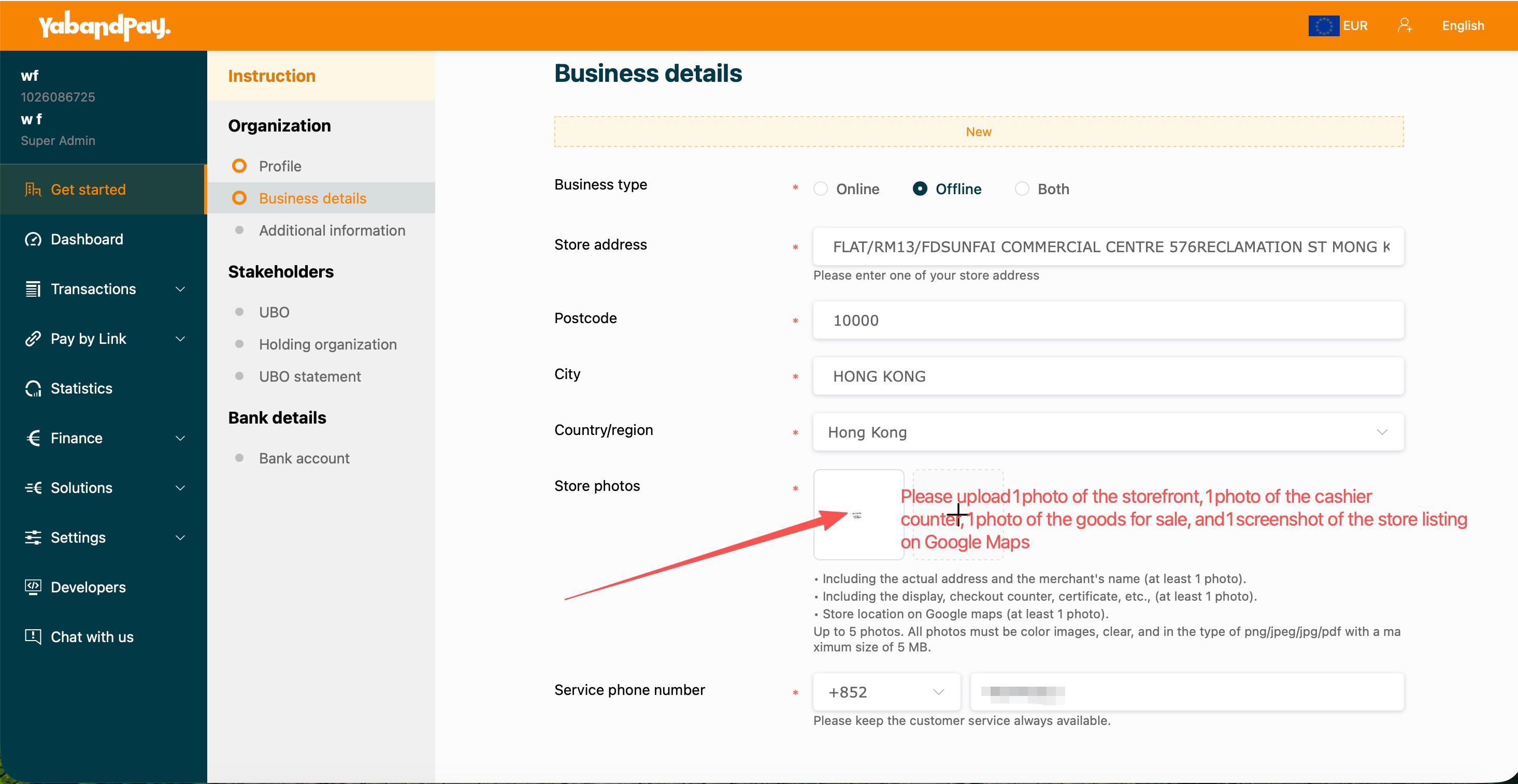
| Option | When it applies |
|---|---|
| Online | Online sales. The source does not show the resulting form; website, page and other evidence requirements depend on the live portal. |
| Offline | Physical sales. The source shows this option's store address, photographs and customer-service phone fields. |
| Both | Both online and offline business. Complete the applicable information for both, not only one channel. |
- Enter the actual store address, postcode, city and country/region. The screenshot allows any one store address; merchants with multiple stores should confirm whether more information is needed.
- Prepare photographs corresponding to that store.
- After adding files, check thumbnails, file count and upload results.
- Enter and verify a usable customer-service phone number including its country/region code.
Store photographs
The source's red annotations suggest 4 images: one storefront, one checkout counter, one main-product photograph and one Google Maps store-listing screenshot.
- Storefront: Show an identifiable business name and store address; at least one photograph.
- Checkout counter: Show the checkout position and actual business environment.
- Main products: Show products actually sold. Service businesses should confirm applicable photo requirements first.
- Google Maps: Show the listed store information; at least one screenshot.
The screenshot body lists storefront, interior and Google Maps as three categories, at least one image each; the interior should show both the checkout counter and main products. The red annotations split the counter and products into two images.
Formats: PNG / JPEG / JPG / PDF; at most 5 files. The Chinese screenshot shows 2MB per file and the English screenshot 5MB. Preparing files at ≤2MB is recommended; the live portal takes precedence.
Confirm special situations first
The source does not explain photo substitutes for online-only businesses or unattended vending sites, or evidence to use without a Google Maps listing. Describe your sales model and operating location to the onboarding team and confirm applicable documents. Do not submit unrelated stores or another merchant's photographs.
Check before continuing: Sales channels are accurate, address and photographs match, images are clear, file count and size meet the requirements, and the customer-service phone is correct.