
YABANDPAY · DOCUMENTATION
05 Vertriebskanäle und Angaben zum Geschäft
Select actual Vertriebskanäle and prepare applicable Filialfotos and Kundendienst- details.
Vertriebskanäle auswählen
Path: Complete information → Company information → Business details.
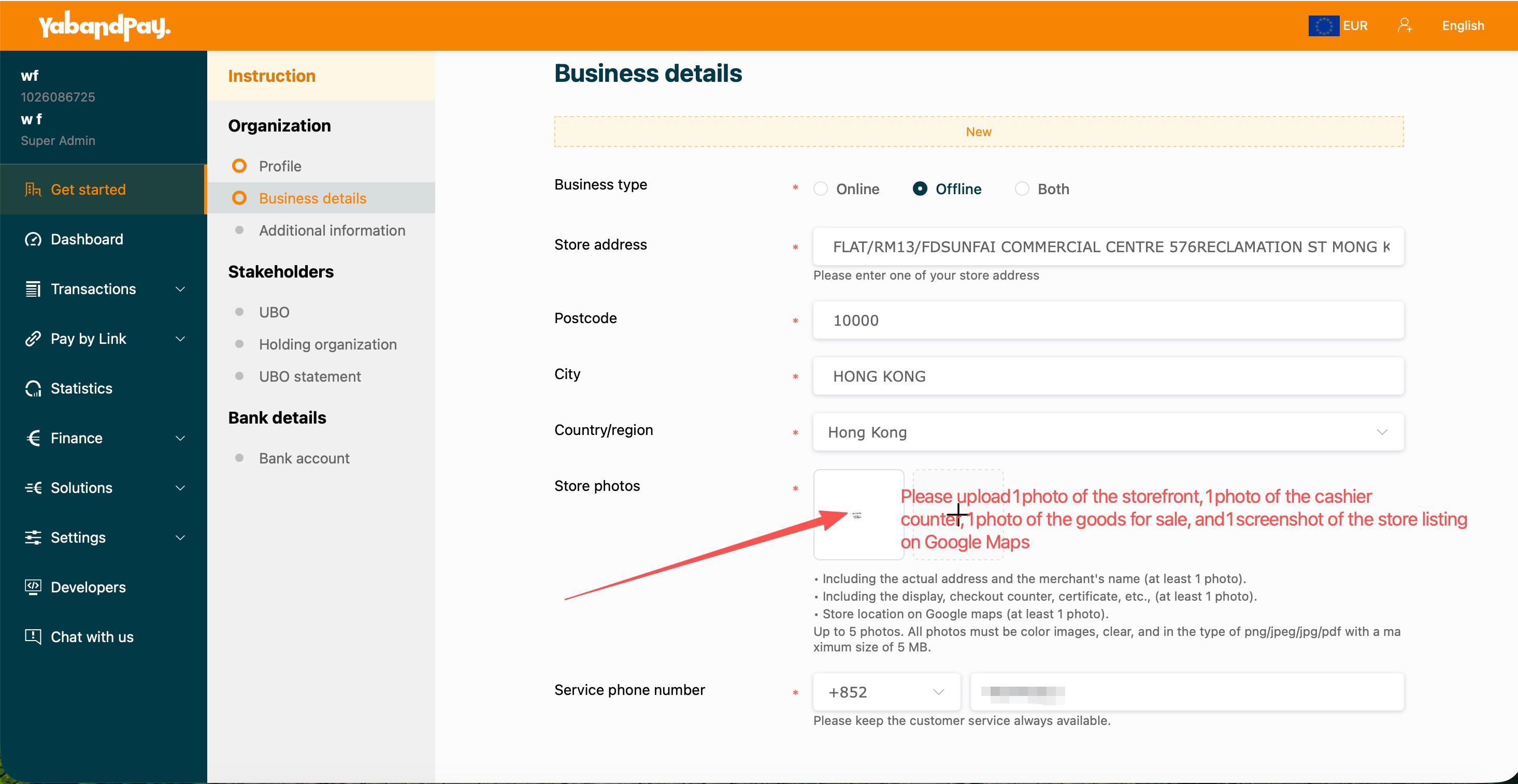
| Option | When it applies |
|---|---|
| Online | Onlineverkäufe. Die Quelle zeigt das daraus folgende Formular nicht; Anforderungen an Website, Seite und weitere Nachweise richten sich nach dem aktuellen Portal. |
| Offline | Stationärer Verkauf. Die Quelle zeigt für diese Option Felder für Filialadresse, Fotos und Kundendienst-Telefonnummer. |
| Both | Online- und stationärer Verkauf. Machen Sie die zutreffenden Angaben für beide Bereiche, nicht nur für einen Vertriebskanal. |
- Geben Sie die tatsächliche Filialadresse mit Postleitzahl, Ort und Land/Region ein. Der Screenshot erlaubt eine beliebige Filialadresse; Händler mit mehreren Filialen sollten klären, ob weitere Angaben erforderlich sind.
- Bereiten Sie Fotos dieser Filiale vor.
- Prüfen Sie nach dem Hinzufügen die Vorschaubilder, Dateianzahl und Upload-Ergebnisse.
- Geben Sie eine erreichbare Kundendienst-Telefonnummer einschließlich Länder-/Regionsvorwahl ein und prüfen Sie diese.
Filialfotos
Die roten Markierungen der Quelle weisen auf 4 images: one storefront, one checkout counter, one main-product photograph and one Google Maps store-listing screenshot.
- Storefront: Show an identifiable business name and store address; at least one photograph.
- Checkout counter: Show the checkout position and actual business environment.
- Main products: Show products actually sold. Service businesses should confirm applicable photo requirements first.
- Google Maps: Show the listed store information; at least one screenshot.
The screenshot body lists storefront, interior and Google Maps as three categories, at least one image each; the interior should show both the checkout counter and main products. The red annotations split the counter and products into two images.
Formats: PNG / JPEG / JPG / PDF; at most 5 files. The Chinese screenshot shows 2MB per file and the English screenshot 5MB. Preparing files at ≤2MB is recommended; the live portal takes precedence.
Confirm special situations first
The source does not explain photo substitutes for online-only businesses or unattended vending sites, or evidence to use without a Google Maps listing. Describe your sales model and operating location to the Onboarding-Team and confirm applicable documents. Do not submit unrelated stores or another merchant's photographs.
Vor dem Fortfahren prüfen: Sales channels are accurate, address and photographs match, images are clear, file count and size meet the requirements, and the Kundendienst- phone is correct.