
YABANDPAY · DOCUMENTATION
Transaktionsübersicht
Zeigen Sie erfolgreiche Zahlungen und Rückerstattungen, Abrechnungs- und Auszahlungsstatus, Nettoeinnahmen und Cashflow-Informationen an.
Die Seite „Transaktionsübersicht“ zeigt alle erfolgreich abgeschlossenen Transaktionen einschließlich Zahlungen und Rückerstattungen an.
Sie können detaillierte Informationen zu jeder abgerechneten oder noch nicht abgerechneten Transaktion für den täglichen Abgleich, Finanzprüfungen und die Ermittlung der Nettoeinnahmen einsehen und Mittel effizienter verwalten.
1. Übersicht der Transaktionsdaten
Rufen Sie Transaktionsdaten auf der Seite „Transaktionsübersicht“ im Händlerportal ab. Die Datumn geben einen schnellen Überblick über aktuelle Zahlungen, Rückerstattungen, Gebühren und Nettoeinnahmen.
| Metric | Beschreibung |
|---|---|
| Payments | Anzahl erfolgreich bezahlter Bestellungen. |
| Umsatz | Gesamte Zahlungseingänge: der von Kunden gezahlte Gesamtbetrag, vor Abzug von Rückerstattungen, Rückbuchungen oder Gebühren. |
| Rückerstattungen | Anzahl erfolgreich erstatteter Bestellungen. |
| Erstatteter Betrag | Gesamtbetrag der an Kunden erstatteten Gelder. |
| Fee | Gesamtbetrag der YabandPay-Gebühren. |
| Nettobetrag | Die Nettoeinnahmen des Händlers, berechnet als: Net value = Revenue – Refunded amount – Fee. |
Use the date selector at the top of the page to filter by date range. You can also search by keywords such as order ID, terminal ID, or order description and export the records as an Excel or CSV file.
2. Funds Status (Status)
Each transaction on the Transaktionsübersicht page includes a funds Status field indicating the current state of the funds. The main statuses are:
| Status | Beschreibung |
|---|---|
| Uncleared | The transaction succeeded but is still in the clearing process and has not yet cleared. |
| Cleared | The transaction has cleared and the funds have entered the settlement process. The funds are expected to arrive on the configured settlement date (Due day). |
| Settled | The funds have settled and have been successfully transferred to the merchant’s YabandPay wallet account. |
| N/A | The status is unknown or no record is available. This usually applies to transactions processed by partner channels, for which settlement information is not displayed in the current system. |
4. Cash Flow
In Transaktionsübersicht, click an order with a status of Cleared or Settled to open its details and view its Cash Flow information.
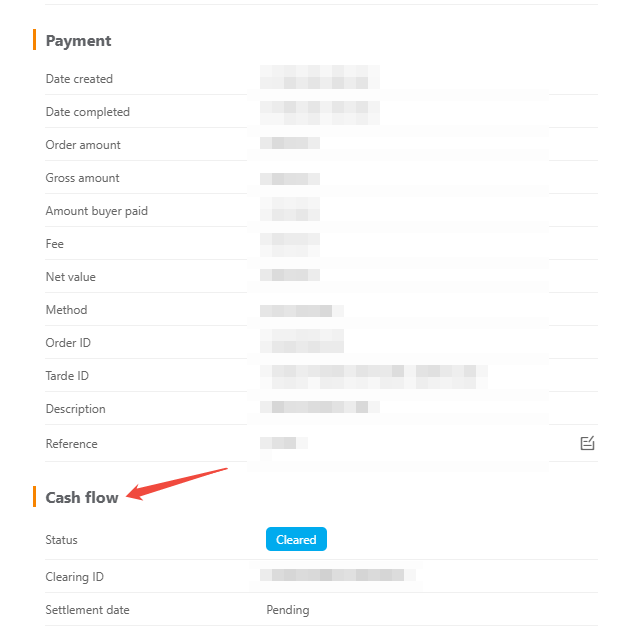
This section shows the transaction’s progress through clearing and settlement, helping merchants determine whether the funds have arrived and whether they can reconcile the transaction or issue a refund.
| Feld | Beschreibung |
|---|---|
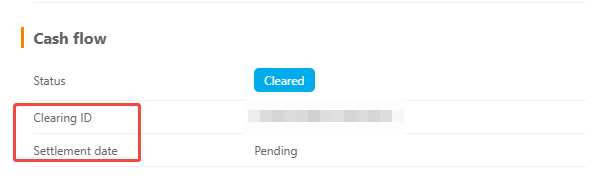
| Clearing ID | The clearing report identifier, which identifies the clearing report containing the transaction and is an important reference for financial reconciliation. This Clearing ID can be found in clearing reports and account activity records. |
| Settlement date | The actual date the funds arrived: the date on which the funds settled and were successfully transferred to the merchant’s wallet. Pending means the funds have not yet settled. |
Tipp
Settlement Cycles Explained
A settlement cycle is the interval between completion of a transaction and receipt of the funds. It is usually expressed as “T+n”, where “T” is the transaction date and “+n” is the number of business days required for the funds to arrive.
For example:
T+1 means the funds will settle and arrive on the next business day after the transaction is completed.
If a customer completes a transaction on Monday (T), the funds are expected to arrive on Tuesday (T+1).
Public holidays will delay the arrival of the funds.