YABANDPAY · DOCUMENTATION
Benachrichtigungseinstellungen
Legen Sie E-Mail-Empfänger für Benachrichtigungen zu Zahlungsvorgängen und Mittelabrechnungen fest. Mehrere Adressen werden unterstützt.
Benachrichtigungseinstellungen allows merchants to configure email addresses for system notifications, ensuring that they receive key information promptly when transactions occur or funds are settled.
By setting notification recipients, you can stay informed of transaction status and settlement progress and improve your finance and operations teams’ response times.
1. Konfigurationsschritte
- Log in to the merchant portal and click “Einstellungen” > “Benachrichtigungseinstellungen” in the left-hand menu.
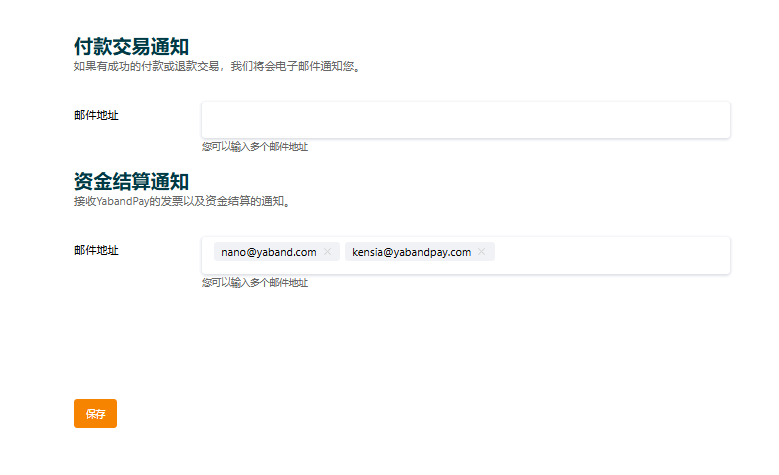
- On the Benachrichtigungseinstellungen page, configure recipient email addresses separately for the following two types of notifications:
2. Benachrichtigungen zu Zahlungsvorgängen
- Enter the email addresses that should receive payment transaction notifications in the corresponding field.
- Multiple email addresses are supported; separate them with commas
,. - When a customer completes a payment, the system automatically sends a notification email to the addresses entered.
3. Benachrichtigungen zur Mittelabrechnung
- Enter the email addresses that should receive funds settlement notifications.
- These notifications help finance staff, operations managers, and other relevant personnel stay informed of settlement status.
- Multiple email addresses are also supported and can be updated at any time.
Tipp
Notes
We recommend using regularly monitored, reliable business email addresses to avoid missing important information because of email issues. Changes to email addresses take effect immediately and require no additional review.