YABANDPAY · DOCUMENTATION
Terminaux POS (Pos terminal)
Consultez et configurez les terminaux POS, notamment leur affectation aux magasins, les paramètres de transaction et les exigences de téléchargement des paramètres.
YabandPay prend en charge les terminaux POS intégrés pour les paiements en personne dans le commerce de détail, l’hôtellerie, les services et d’autres secteurs. Les marchands peuvent gérer tous les terminaux depuis le portail, consulter leur statut en temps réel et configurer les paramètres afin de garantir une acceptation des paiements stable et efficace.
1. Consulter et gérer les terminaux POS
View Devices
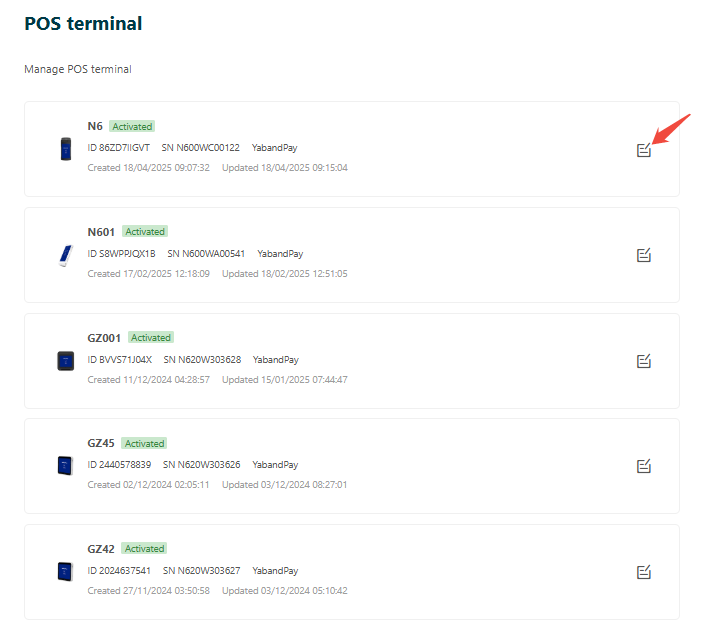
- Connectez-vous au portail marchand et cliquez sur “Settings” > “POS Terminals” dans le menu de gauche.
- La page affiche les informations de tous les appareils POS enregistrés, notamment :
- Terminal ID
- Type
- Serial Number
- Activation Status
Edit Devices
Cliquez sur “Edit” à droite d’un appareil pour ouvrir sa page de détails et configurer ses paramètres. Les options comprennent notamment :
| Setting | Description |
|---|---|
| Terminal Type/Model | Modèle matériel de l’appareil, par exemple N86. |
| Terminal Name/Serial Number | Nom défini par le marchand et numéro de série matériel. |
| Assigned Store/Cashier Account | Sélectionnez le magasin marchand et le compte Cashier associés au terminal. |
| GSA Configuration | Settings de communication, notamment le Profile and GSA Port. |
| Theme/Interface Color | A choice of white or blue theme. |
| Input Keyboard Type | Software keyboard / hardware keyboard. |
| PIN Protection | Whether to enable screensaver password protection, with support for a custom password or PIN verification. |
| Auto-Start App | Whether to launch the payment acceptance app automatically after startup. |
| Transaction Parameters | Enabled transaction types, such as Sale, Preauth, Refund, and CNP. |
| Payment Methods | Supported payment card types and methods, such as Visa, Mastercard, Maestro, and QR codes. |
| Settlement Currency | Available settlement currencies, such as EUR, GBP, and HKD. |
| Print Configuration | Whether to enable printing of receipts, settlement reports, and other documents. |
| Status Toggle | Controls whether the terminal is enabled or disabled. |
2. Manage Other Devices
In addition to the Terminaux POS module, you can view and manage all registered devices, including non-POS devices, under “Settings” > “Device Management”. On that page, you can:
- Add new devices.
- Add, edit, or delete individual devices.
- Consultez le statut d’activation de l’appareil et ses autorisations opérationnelles.
Conseil
Notes
Each POS terminal must be assigned to a store and a Cashier account. This Cashier account is generated automatically and is used only for POS transactions.
After changing terminal parameters, you must download the parameters again on the POS terminal for the changes to take effect.